
Service ownership, feature state, content readiness, and QA progress were difficult to compare.
Back to projects
Case study 03 / Release operations platform
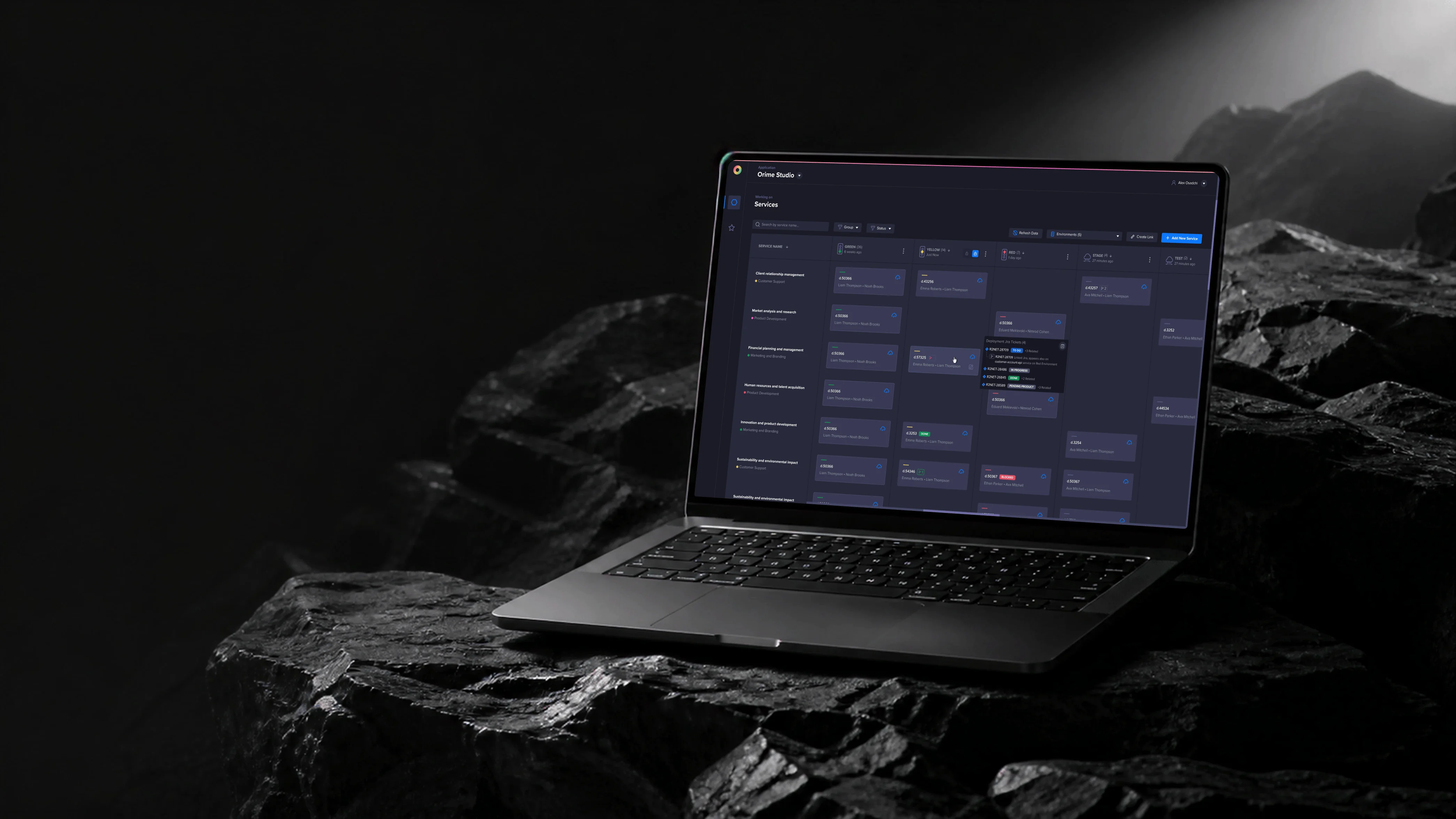
Zero gives teams a shared map of services, features, and release readiness.
A service and feature management system for product managers, content teams, and QA, designed to clarify ownership, dependencies, deployment status, and release confidence.
Overview
A service and feature control layer for product, content, and QA teams.
Product managers, content managers, QA teams, operations, and feature owners.
Product architecture, workflows, dashboard design, interaction patterns, and UI system.
A shipped workspace for service visibility, readiness checks, dependencies, and launch decisions.
Challenge
The system had to align different teams without flattening their workflows.
Releases ran on two alternating environments, where service state and feature readiness were difficult to compare. Product, content, and QA teams each saw the same release from a different angle.
The challenge was creating one system where each team could see its own work while still understanding the broader release picture — so I designed around status clarity, ownership, filtering, and readiness signals.
System model
Release readiness emerges from connected service, feature, environment, and evidence records.
-
Catalog
Service
Health, owner, and dependencies
-
Change
Feature
Configuration and rollout state
-
Runtime
Environment
Red, QA, Green, and focused tests
-
Evidence
Deployment record
Jira work, owner, deadline, and blockers
-
Decision
Readiness gate
Owned checks before the next stage
The same model supports product, engineering, content, QA, and release teams without giving each group a disconnected version of the release.

A shared control surface for release readiness.
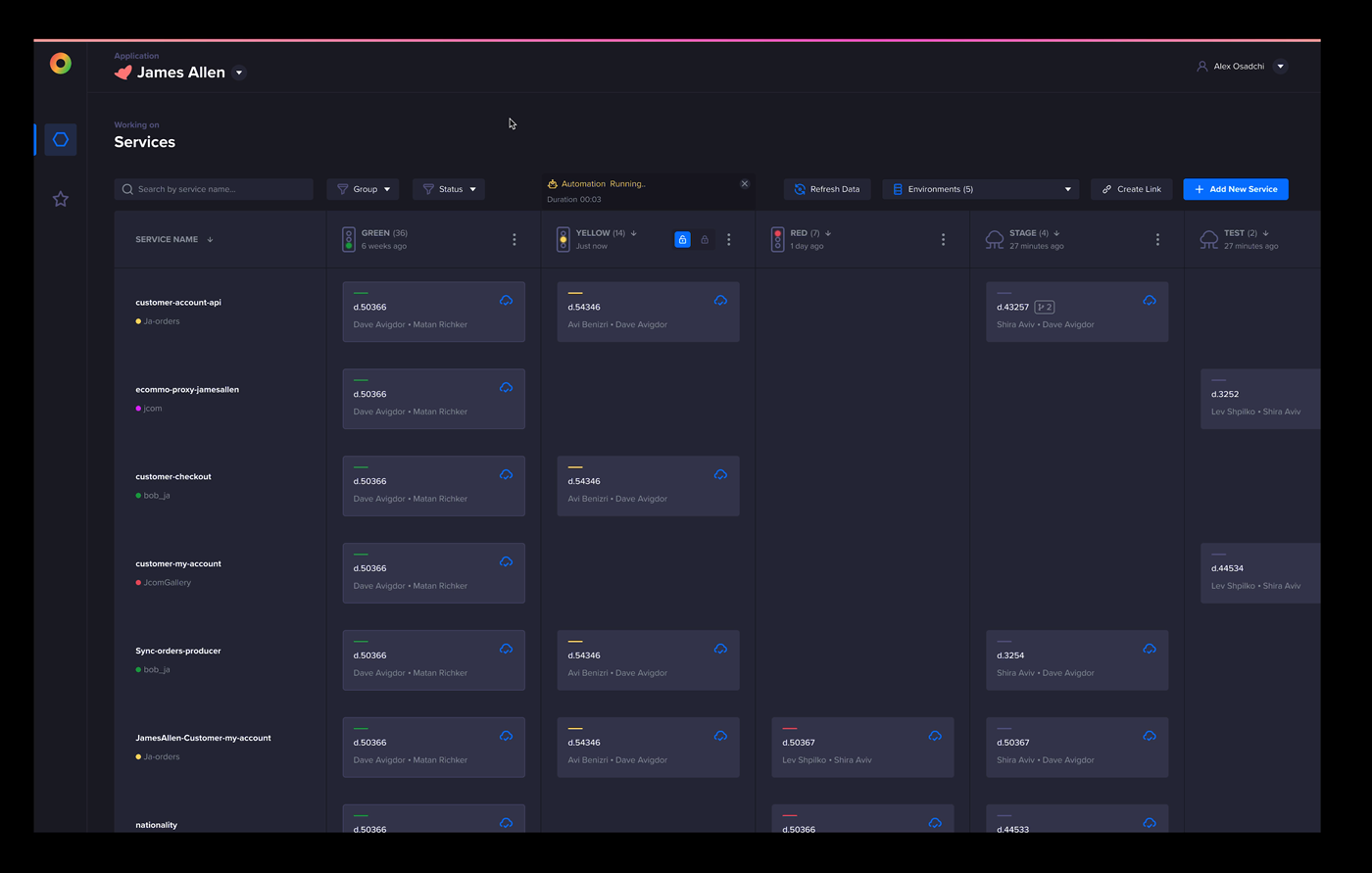
The main board turns service status into a working model: teams can compare environments, detect blockers, inspect ownership, and move from high-level health to specific deployment evidence.
Flow in motion
Operational flows that connect service status to release evidence.
Deployment evidence
Connect service cards to Jira context.
The flow shows how teams can move from service health into related deployment work without losing the board view.
Process
From fragmented status tracking to a clear product operations model.
Research
Mapped team responsibilities, release blockers, repeated checks, and visibility gaps.
IA
Defined the hierarchy for services, features, ownership, readiness, dependencies, and QA states.
Flows
Designed paths for service setup, feature review, QA approval, and launch tracking.
System
Created reusable cards, status chips, filters, checklists, and operational detail views.
Delivery
Specified empty states, permissions, readiness rules, and dense dashboard behavior; partnered with the product manager and three engineers through implementation and design QA.
End-to-end flow
How a feature earns its way from Red to Green.
-
Red / Configure
Develop the feature and connect its context
Configuration, services, Jira work, dependencies, and ownership become visible in one stage.
-
Gate 01
Confirm readiness for QA
Feature owners, developers, and product verify configuration, dependencies, and sign-off.
-
QA / Validate
Run tests and review release conditions
Automation, content, geographical rules, and focused test environments are checked together.
-
Gate 02
Decide whether the feature can go Green
QA, content, product, and release owners confirm that tests passed and blockers are cleared.
-
Green / Release
Ship with deployment evidence attached
The live state keeps deployment evidence, ownership, and deadlines visible for inspection.
-
Exception path
Return blocked work to the right environment
Failed checks route work back to Red or QA instead of letting an unclear state move forward.
Environment stage
Decision gate
Gate passed
Blocked return
End state
Readiness here is not a status field — it is a sequence of gates a feature has to pass, and every check at every gate has an owner who is best placed to judge it.
The gates exist because every team answers a different question about the same release: content asks whether it reads right, QA asks whether it holds, the release owner asks what exactly will change on Green. Turning those questions into owned checks is what let one board work for all of them.
One service model
Created a shared structure for features, owners, content state, QA state, and release readiness.
Role-aware views
Designed views that support different teams while keeping the same underlying service model.
Readiness over reporting
Shifted the UI from passive status reporting toward visible next steps and blockers.
Exceptions and safeguards
A release cannot advance when its evidence, dependencies, or owned checks are unresolved.
Return blocked work to the correct stage.
Failed checks route a feature back to Red or QA instead of letting an ambiguous status move toward production.
Expose the work behind a service state.
Linked services, Jira evidence, owners, and blockers make the cause of a readiness issue inspectable.
Keep configuration differences visible.
Environment comparisons show where a feature or service differs before the release owner makes a Green decision.
Final experience
Screens that make service health, feature progress, and ownership easy to scan.
01 / Deployment evidence
Keep service health connected to the work behind it.
The Jira deployments drawer lets teams move from a service card into linked tickets, statuses, summaries, and related work without losing the broader board context.

02 / State comparison
Make environment changes explicit before they ship.
A focused state modal compares active and alternate services so release owners can review what will change, select the right services, and confirm with confidence.

03 / QA automation
Make QA automation a visible, owned action.
Automation state, ownership, and next steps sit beside the services board, so QA can turn automation on and teams can act on results without switching tools.
04 / Feature inventory
Turn feature rollout into a matrix teams can scan.
The feature table maps feature names, groups, environments, values, and scheduled variants so product and content teams can see rollout differences at a glance.

05 / Configuration model
Expose complexity without making setup feel chaotic.
The feature configuration view organizes type, status, values, dates, expired states, and environment rules into repeatable panels for faster review and updates.

06 / Geographic targeting
Make regional rollout decisions visible and reversible.
The location selector pairs a country list with a world map so teams can understand mixed states, selected regions, and value assignments before updating an environment.

Observed impact
From fragmented release coordination to one inspectable operating model.
Zero replaced repeated status reconstruction with a shared product model for services, environments, ownership, dependencies, and release readiness.
Teams reconstructed release status from separate tools, Jira context, and direct coordination while alternating environments made readiness difficult to compare.
Services, features, owners, blockers, dependencies, environments, and readiness checks became visible through one Red, QA, and Green release model.
Repeated status chasing and manual preparation gave way to direct release visibility, helping teams find missing ownership, blocked work, and environment risk earlier.
First-party release data made recurring blockers, delayed environments, dependency patterns, and ownership gaps usable inputs for improving the process over time.
Why in-house mattered
Owning the release platform made deployment logic adaptable to the company instead of dependent on a third-party operating model.
Service relationships, release status, owners, blockers, and Jira evidence could be managed in a company-owned control layer, reducing sensitive operational context spread across external tools.
Red, QA, and Green environments, additional test environments, dependencies, and readiness rules could evolve with the company's actual deployment process.
Developers who understood the services and release model could trace product issues directly and respond without depending on a third-party roadmap or support cycle.
Because release history lived in a company-owned model, each cycle's blockers, delays, and ownership gaps became signals the team could act on directly in the next process improvement.
Operational impact
A release operating model that made service deployment easier to inspect before production.
Replaced a fragile two-environment workflow with a clearer Red, QA, and Green release model, while still allowing additional environments for focused testing.
Gave product, QA, developers, and release owners a shared view of each deployment: connected services, feature work, owners, deadlines, blockers, and related tickets.
Made release confidence easier to build by exposing bottlenecks, dependencies, and environment readiness before work reached production.
The workflow moved from alternating environments into a clearer path for development, validation, and production release.
Teams could open a deployment and understand its linked services, feature work, Jira context, owners, developers, lead, deadline, and blockers.
Status, dependencies, and environment readiness became visible earlier, giving teams more room to test and resolve issues before production.